 Abd0_M0
Credential theft from a Windows workstation memory image
A 4 GB memory capture, one suspicious process, and a path from initial execution to lateral movement.
Scenario
The SOC flagged an outbound connection from a finance workstation to an unfamiliar host. An analyst captured memory before isolating the machine. My task was to confirm the compromise, find out which accounts were exposed, and say whether the attacker moved on.
Was this workstation used to steal credentials, and did those credentials reach other systems?
Evidence and tools
workstation.mem, raw capture, 4 GB, hash verified on receipt- Volatility 3 for process, network and handle analysis
- Exported Windows event logs from the domain controller
- Timesketch to merge memory and log timestamps into one timeline
I worked on a copy and kept the original hash in my notes, so every finding below can be reproduced.
Analysis
Process tree
A process named like a system service was running from a user profile folder instead of System32, and its parent was an Office application.
# list processes with parent and path
$ vol -f workstation.mem windows.pstree
$ vol -f workstation.mem windows.cmdline

# look for injected memory regions in the suspect process
$ vol -f workstation.mem windows.malfind --pid 4128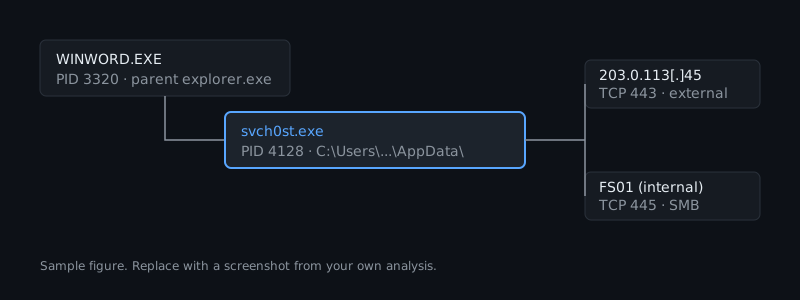
Network connections
The same process held an established connection to an external host and a second one to an internal file server over SMB. The second connection is what turned this from a single-host case into a spread case.
$ vol -f workstation.mem windows.netscanCredential access
Handles on the LSASS process, plus a memory region with executable permissions and no backing file, pointed to credential dumping. Authentication events on the file server matched the timing.
Timeline
- 09:14 UTCDocument openedOffice application starts a child process.
- 09:15 UTCPayload runningFake service process starts from the user profile folder.
- 09:21 UTCLSASS accessedHandle opened on the credential store.
- 09:37 UTCLateral movementSMB logon to the file server using a finance account.
Findings and IOCs
| Type | Value | Note |
|---|---|---|
| Process | svch0st.exe |
Runs from a user profile path |
| IP | 203.0.113[.]45 |
External host, outbound connection |
| Domain | update-check[.]example |
Resolved by the payload |
| SHA-256 | e3b0c442…b855 |
Payload dump (sample value) |
Indicators are defanged and the values are samples. In a real write-up I list the technique ID beside each finding so a reader can search the ATT&CK matrix.
Conclusion and recommendations
The workstation was compromised through a malicious document and used to dump credentials. The file server logon shows the attacker moved at least one step further.
- Reset the exposed finance account and any account that logged on to the workstation
- Block the external host and domain, and search other endpoints for the process name
- Turn on LSASS protection and restrict Office child processes
- Review the file server for access after 09:37 UTC
What I would do differently
I would collect the file server's memory as well, since I could only confirm the logon from event logs.